How SPAKO users opt in to SMS
SPAKO uses SMS solely to deliver a one-time verification code when a user signs in. This page documents exactly where and how that consent is collected inside the app, for carrier and campaign review purposes.
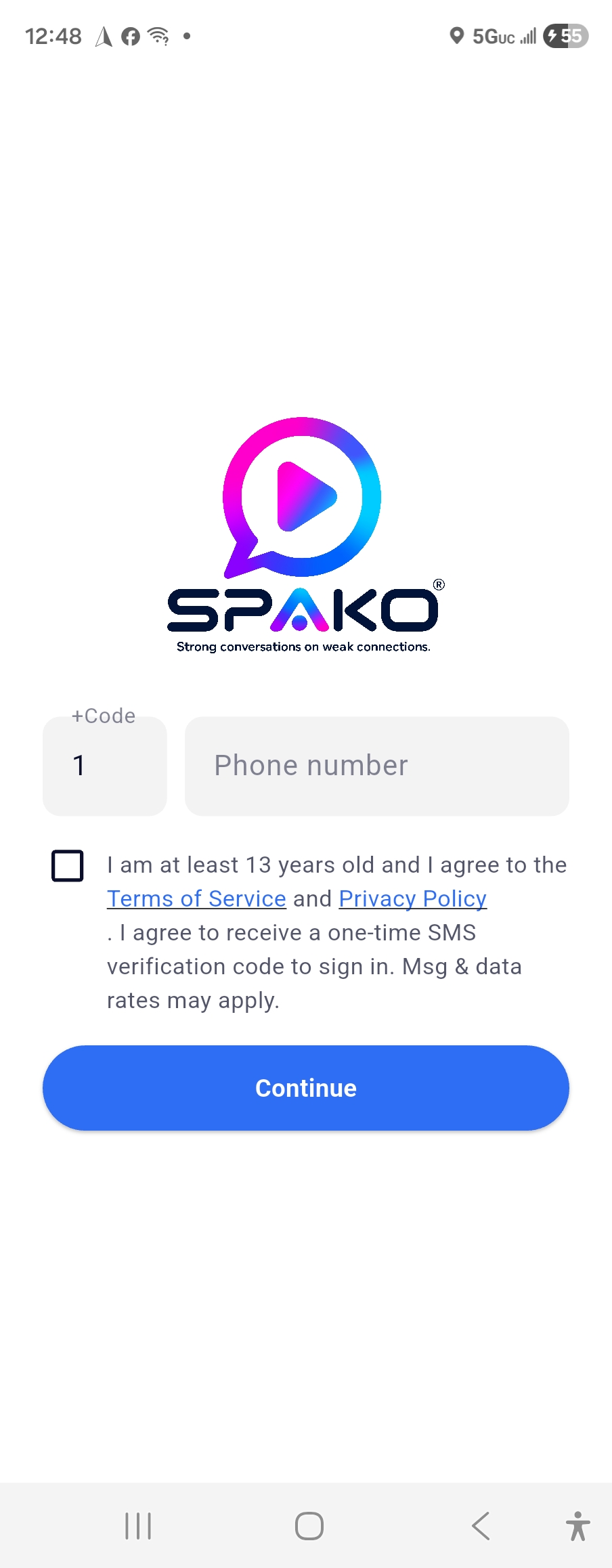
Actual sign-in screen from the SPAKO app
Opt-in checkbox text (verbatim)
This checkbox sits directly above the phone number field and the Continue button, as shown in the screenshot. The checkbox is unchecked by default — the user must actively check it before Continue becomes active.
How consent is collected
- User opens the app and reaches the sign-in screen.
- User enters their phone number in the phone number field.
- User reads and checks the consent checkbox, which links out to the live Terms of Service and Privacy Policy and states plainly that a one-time SMS verification code will be sent, and that message and data rates may apply.
- User taps Continue. Only after the checkbox is checked does SPAKO send the one-time SMS code to the number entered.
- User receives exactly one SMS containing the verification code, enters it in the app, and is signed in.
Message program details
SPAKO does not use this number for marketing, promotional, or recurring messages of any kind — only the single verification code needed to complete sign-in. Users can stop receiving messages at any time by not requesting a new code (no further SMS is sent unless the user initiates another sign-in).